6 Part III: Creating and Joining Datasets
Moose density and browsing preferences
The team of researchers we curious if moose browsing preferences changed depending on moose density. They hypothesized that at
At low moose densities: browsing would be selective, with moose favoring the most palatable tree species.
At high moose densities: Would have high competition, and browsing pressure would become less selective, with moose consuming all sapling species more uniformly.
In this section, we will merge the Moosedataand the Sapling datasets, to explore how browsing intensity on different tree species correlates with moose density across ecoregions. You will practice using the left_join() function to combine these dataset
Step 1
a) Using the orginal Moosedata dataset, filter() function to select only the rows for the year 2020. Then create a new column called MooseDensity using the mutate() function. Save the dataset under a new name called MooseData_2020. (HINT: you previously did this for in Part I, Step 8)
- Use
left_join()to joinMooseData2020with theSaplingsdataset, matching rows by the commonEcoregioncolumn.
MooseSaplingData <- left_join(Moosedata, SaplingData, by = 'Ecoregion', relationship = "many-to-many")Step 2
Using the dataset you just created, calculate the average browsing score and average moose density for each species within each ecoregion, save your dataset under the name BrowsingBySpeciesDensity.
With the help of pipes %>% , group_by Species and Ecoregion, then use summarize() to find the mean() BrowsingScore, and then find the mean() MooseDensity. Print the result using the print() function. HINT: There is example code using pipes %>% in Part I, Step 9 and Park II Step 8.
HAND-IN Question 10
What is the average browsing score for alder in the Central Forest Ecoregion?
Step 3
The research team created the following figure to help visualize how average browsing intensity on different tree species changes with moose density across ecoregions. The graph uses the ggplot2 package, which is beyond the scope of this assignment. However, if you would like, you can copy and paste the code below into your R console to explore the plot.
## Warning: package 'ggplot2' was built under R version 4.5.2ggplot(BrowsingBySpeciesDensity, aes(x = AvgDensity, y = AvgBrowsing, color= Species)) +
geom_point(size = 3) +
theme_minimal() +
labs(title = "Browsing Intensity Across Moose Density by Species",
x = "Average Moose Density",
y = "Average Browsing Score")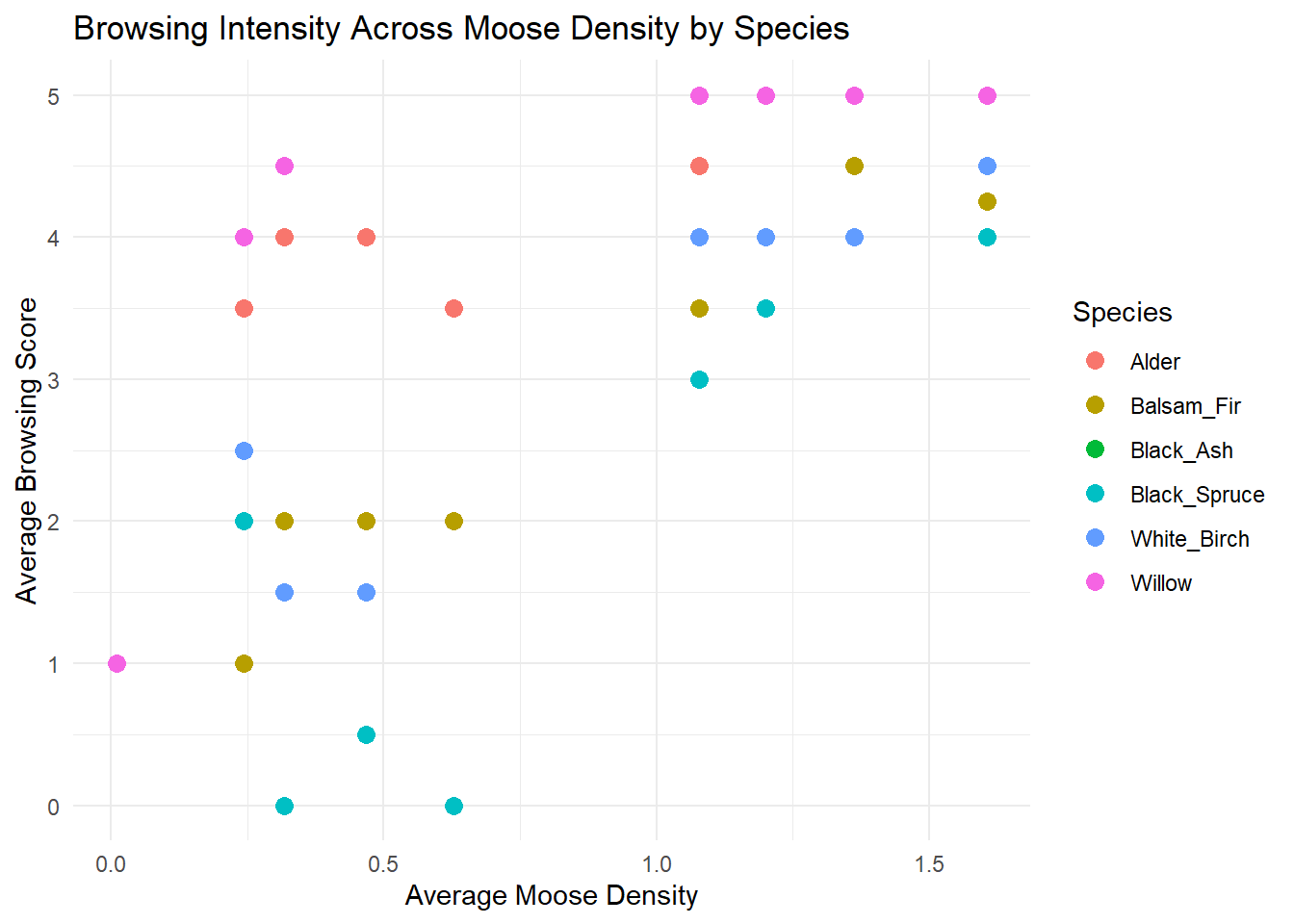
HAND-IN Question 11
Based on the figure, answer the following questions using 1-2 sentences.
- Is there evidence that supports the researchers’ hypothesis? Do moose show strong preferences at low density and shift to more generalist browsing at higher density? Add a short comment (1-2 sentences) with your answer.
- Which sapling specie(s) do moose favour the most? Which do they browse the least? Add a short comment (1-2 sentences) with your answer.
- Which sapling species is not shown on the figure and why? Add a short comment (1-2 sentences) with your answer.
6.0.1 Moose-vehicle collisions
As moose populations expanded across Newfoundland in the 20th century, so did the frequency of moose-vehicle collisions. These incidents pose serious risks to both humans and wildlife, especially in regions where roads intersect key moose habitat.
In this section, you’ll explore a simplified dataset containing the number of recorded moose-vehicle collisions per ecoregion in 2020. Your goal is to investigate whether moose density in an ecoregion can help explain collision patterns.
Step 4
Copy and paste each vector below, then run them so they appear under your Values section in the Envionment.
Then add a line of code (example given below) where you use the data.frame() function, create a dataset using your vectors called MooseCollisions.
Collisions_2020 <- c(56, 60, 14, 36, 48, 10, 40, 110, 6)
HumanPopulation <- c(18000, 12000, 4000, 75100, 24000,3500, 32000, 270000,    2300)
StudySites <- c("North_Shore_Forests","Northern_Peninsula_Forests", "Long_Range_Barrens","Central_Forests","Western_Forests","EasternHyperOceanicBarrens","Maritime_Barrens","Avalon_Forests","StraitOfBelleIsleBarrens")

MooseCollisions <- data.frame(StudySites, HumanPopulation, Collisions_2020)
Step 5
- Now let’s join this dataset with
Moosedatafiltered for just the year 2020 (from Part I, Step 8). Try to useleft_join()to join them. HINT: follow the template of the code you used above in Step 1.
HAND-IN Question 12
Why did the left_join function in Step 5a here not work? What do you need to do fix it?
Use the
rename_with()function, to change the column name of one of the datasets to match the other, so that they can be joined. Here is some template code that you can adapt to make the necessary change.Template: rename_with(NewName = OldName)
Now join the datasets into a new dataset using
left_join(). HINT: follow the template of the code you used above in Step 1.
Step 6
Use the plot() function to create a scatterplot of MooseDensity and Collisions_2020
HAND-IN Question 13
How does moose density relate to the number of moose-vehicle collisions? What trends do you see? Are there any outliers?
Step 7
Create a new column called CollisionsPerCapita that is equal to Collisions_2020 divided by HumanPopulation. HINT: Use the mutate function as you did in Part I, Step 5, but with appropriate variables.
Step 8
Use the plot() function to create a scatterplot of CollisionsPerCapita versus HumanPopulation
HAND-IN Question 14
What trends you see in these data? Which ecoregions have the highest number of moose collisions per person? Does this trend make sense based on what you know about moose and human populations in Newfoundland?